
At 8:42 on a weekday morning, a pharmacy counter in Zürich is already busy. The card terminal pauses, the dispensing system takes too long to load, and the queue grows while someone blames the router. That diagnosis may be wrong. The fault could sit in the local access point, a damaged cable behind the counter, the in-store switch, the fibre handover, or the provider's wider network.
That's the practical meaning of WAN vs LAN for a Swiss small business. You need to know whether the delay starts inside your premises or beyond it, because replacing a router won't repair a congested provider route, and ordering a faster internet line won't fix a poor Wi-Fi layout. The comparison below gives you the working distinction before we examine the decisions in detail.
| Area | LAN | WAN |
|---|---|---|
| Where it operates | Inside the shop, spa, pharmacy, or office | Between the premises and external services or sites |
| Typical equipment | Switches, access points, Ethernet cabling, local firewall | Fibre service, provider router, 5G or mobile backup, carrier routing |
| Main concern | Local coverage, segmentation, switching, device access | Internet and cloud access, route quality, resilience, provider performance |
| Who controls it | Mostly the business or its IT partner | The business controls policy, but the provider controls much of the transport |
| Best diagnostic clue | One room, device, or cable run is affected | Multiple devices or cloud services are affected together |
Why Your Checkout Lag Might Not Be Your Router
The owner of a Bahnhofstrasse pharmacy watches the first queue form at the till. A customer taps a card, waits, and taps again. The cashier points at the router in the back office. The owner looks at the cable disappearing behind the counter and asks a better question: where does the delay begin?
That question matters because a checkout transaction crosses several network layers. The terminal may connect over Wi-Fi to an overloaded access point. It may use a damaged Ethernet cable. The switch may have a failing port. The router may be healthy while the fibre handover or upstream provider is struggling. Each fault looks similar to a person standing at the till, but each requires a different fix.

Start with the smallest affected area
Ask who is experiencing the problem. If one terminal is slow while the others work normally, inspect that device, its cable, its switch port, or the nearest wireless access point. If every till and back-office computer slows at the same time, move your attention towards the switch uplink, firewall, fibre connection, or provider.
A simple test also helps. Compare a local task with an external one. If a computer opens files from an in-store server quickly but struggles with a cloud application, the LAN may be functioning while the WAN is underperforming. If local printers, cameras, and shared files all respond slowly, the fault probably sits closer to the premises.
Practical rule: Don't approve a new internet contract until someone has tested the cable, switch port, access point, firewall, and provider handover separately.
Ask for evidence, not guesses
Your IT partner should check latency, jitter, and packet loss, not only a headline download speed. The Swiss measurement framework includes these quality indicators alongside download and upload performance, as described by the Federal Office of Communications internet quality testing programme.
The useful checklist is short:
- One device affected: Test the terminal, cable, power, and switch port.
- One room affected: Check access-point placement, interference, and cabling.
- The whole shop affected: Test the firewall, WAN handover, and provider route.
- Only cloud services affected: Compare local traffic with external traffic.
- Intermittent failures: Review packet loss and jitter over time rather than relying on one speed test.
This method prevents the most expensive mistake in small-business networking, treating every performance complaint as a router problem.
Defining LAN and WAN in Plain Swiss Terms
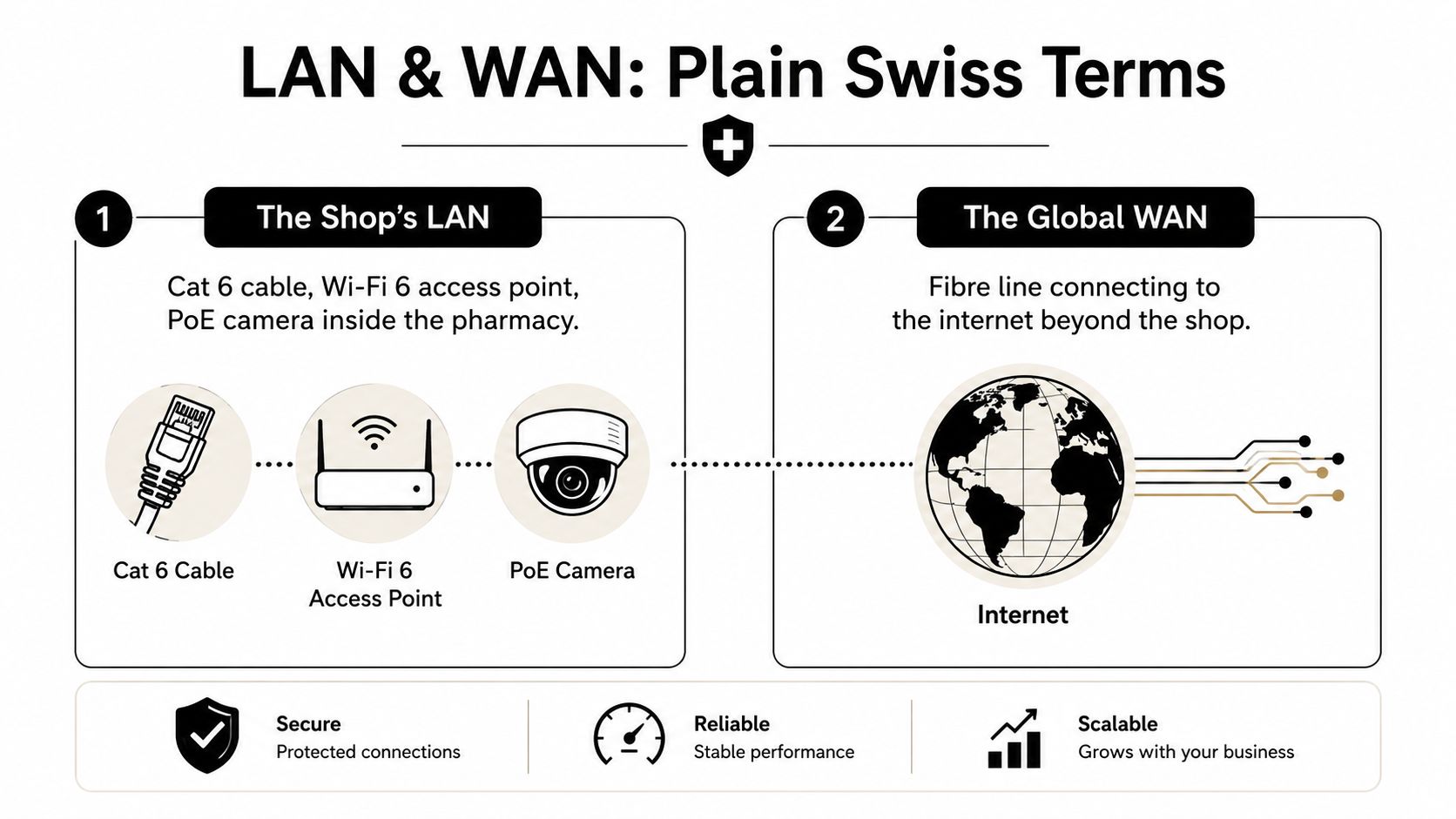
A Local Area Network, or LAN, is the equipment and cabling inside your premises. In a shop, that might be the Cat 6 cable from the back-office rack to the till, the managed switch behind a shelf, and the Wi-Fi access point above reception. In a spa, it includes ceiling-mounted access points, wired treatment-room equipment, office computers, and PoE cameras. In a pharmacy, it includes the dispensing terminals, scanners, printers, and local security devices.
The LAN is the part you can physically inspect and configure. You decide where the switch sits, which devices share a network segment, which ports carry power, and whether customer Wi-Fi is separated from business equipment. A well-designed LAN keeps local traffic predictable and limits the damage caused by a misplaced cable, an insecure device, or an overloaded access point.
The WAN starts at the premises edge
A Wide Area Network, or WAN, begins where your local network hands traffic to an external service. That could be a Swisscom or Sunrise fibre handover, a Quickline cable connection, a 5G fixed-wireless service, or a private connection to a central pharmacy ERP platform.
You own or manage the business policy, but you generally rent the transport. The provider owns much of the physical path, manages the access circuit, and controls the wider routing beyond your firewall. That ownership boundary explains why a WAN fault often requires a provider ticket, while a LAN fault can usually be corrected by your IT partner.
The distinction also matters for cloud work. A terminal may be physically inside the shop, but if it relies on a hosted checkout, booking, stock, or dispensing service, its user experience depends on both networks. The LAN carries traffic to the edge. The WAN carries it beyond the edge.
For a broader explanation of how network design supports operational performance, this networking for business efficiency resource is useful background. The practical lesson is straightforward: LAN is the workshop you control, WAN is the delivery route you depend on.
Side-by-Side Comparison Across Speed, Cost, and Control
LAN is your workshop, WAN is your delivery route.
The most useful WAN vs LAN comparison isn't a contest over which technology is faster. It's a question of what the business needs to control, what it must pay for continuously, and where performance can deteriorate outside the building.
| Dimension | LAN | WAN |
|---|---|---|
| Speed | Usually optimised for high-throughput local switching | Depends on the access circuit, provider network, route, and service destination |
| Latency | Usually very low because traffic travels within the premises | Influenced by distance, interconnects, congestion, and international routes |
| Ownership | The business owns or controls much of the cabling and equipment | The provider usually owns the access infrastructure and external transport |
| Cost model | Hardware and installation are mainly upfront, followed by support and replacement | Service charges recur, with possible installation, support, and resilience costs |
| Control | You can change ports, segments, access points, and local policies | You can set traffic policy, but physical repair and route changes depend on the provider |
Speed and latency
Inside a well-cabled shop, traffic between a terminal and a local resource has little distance to cross. A WAN connection can be excellent, but it still depends on the access line and every relevant route between the premises and the service. A cloud application may respond well to one destination and poorly to another, even while the local switch remains healthy.
Don't buy capacity for the wrong layer. A faster LAN uplink won't repair a provider route, and a faster WAN circuit won't improve a dead spot above the spa reception desk.
Ownership and control
Your IT partner can replace a switch, recable a counter, move an access point, or rebuild a local segment without waiting for a carrier. WAN changes are different. The provider may need to investigate the last mile, exchange equipment, backbone routing, or a fault beyond Switzerland.
That's why contracts deserve the same attention as hardware. Review repair commitments, escalation routes, service boundaries, and what the provider measures. A useful business internet comparison guide can help owners frame those questions before comparing offers.
Cost
LAN expenditure is concentrated in the premises. You pay for cabling, switches, wireless equipment, firewall hardware, installation, and ongoing management. WAN expenditure continues for as long as the circuit is required, and resilience adds another service relationship, device, or mobile plan.
For a single-site SMB, the sensible approach is usually a properly designed LAN and a WAN service matched to the business's actual cloud and payment dependencies. Don't pay for enterprise complexity merely because the supplier presents it as more professional.
What Swiss Performance Numbers Mean for Your Network
Swiss connectivity is mature, but national availability doesn't mean every premises has the same underlying WAN. Broadband access reached 46.4% of the population at the end of 2024, placing Switzerland fourth in the OECD, behind South Korea, France, and Norway, according to ComCom's penetration-rate information. A separate federal figure recorded 46.75% in mid-2024, compared with an OECD average of 36.3%, reinforcing how central high-capacity access has become in Switzerland.
Coverage also varies by canton and by technology. By mid-2023, 99.9% of Swiss households could access at least one broadband technology, including 99.5% of rural homes, while very-high-capacity fixed networks covered 89.3% of households nationally and 81.6% of rural households, as reported by the Swiss Federal Statistical Office's internet infrastructure indicators.
Availability isn't the same as fibre depth
The canton matters. Genève, Bern, Neuchâtel, and Basel-Stadt recorded very-high-capacity coverage above 95%, while Schaffhausen and Thurgau were below 65% in the cited federal coverage data. FTTP coverage was especially strong in Basel-Stadt at 93.3% and Genève at 93.2%, while 12 cantons remained below 35% FTTP coverage.
For an owner, this changes the procurement conversation. Don't ask only whether fibre is available at the address. Ask which technology reaches the building, what upload service is provided, whether the circuit is shared, and what backup path is fully independent.
Measure the experience, not just the headline speed
Swiss quality testing includes download and upload speed, round-trip time, jitter, and packet-loss ratio. Fixed-access latency measured by nPerf averaged 18 ms in 2020 and 11.72 ms in 2023, according to the Swiss country performance data published by meter.net. Those figures show why a Swiss WAN can perform very well, but they don't guarantee that every provider, route, or time window will behave identically.
Use those measures to diagnose the customer experience:
- Latency: Important for interactive payment, voice, booking, and dispensing workflows.
- Jitter: Important when timing varies from packet to packet, especially for voice and live sessions.
- Packet loss: Important when applications repeatedly resend information or sessions drop.
- Upload capacity: Important for cloud backups, cameras, file synchronisation, and hosted systems.
If your supplier reports only download speed, ask for the missing measurements. A LAN can be fast while the WAN remains unsuitable for the applications your staff use every day.
Real Set-Ups for Retailers, Spas, and Pharmacies
The right architecture changes with the floor plan and the workflow. A boutique retailer needs clean separation between payment, staff devices, and guests. A spa must protect booking and office access across rooms with different construction materials. A pharmacy needs tighter control around dispensing equipment and sensitive operational data.
Boutique retailer in Bern
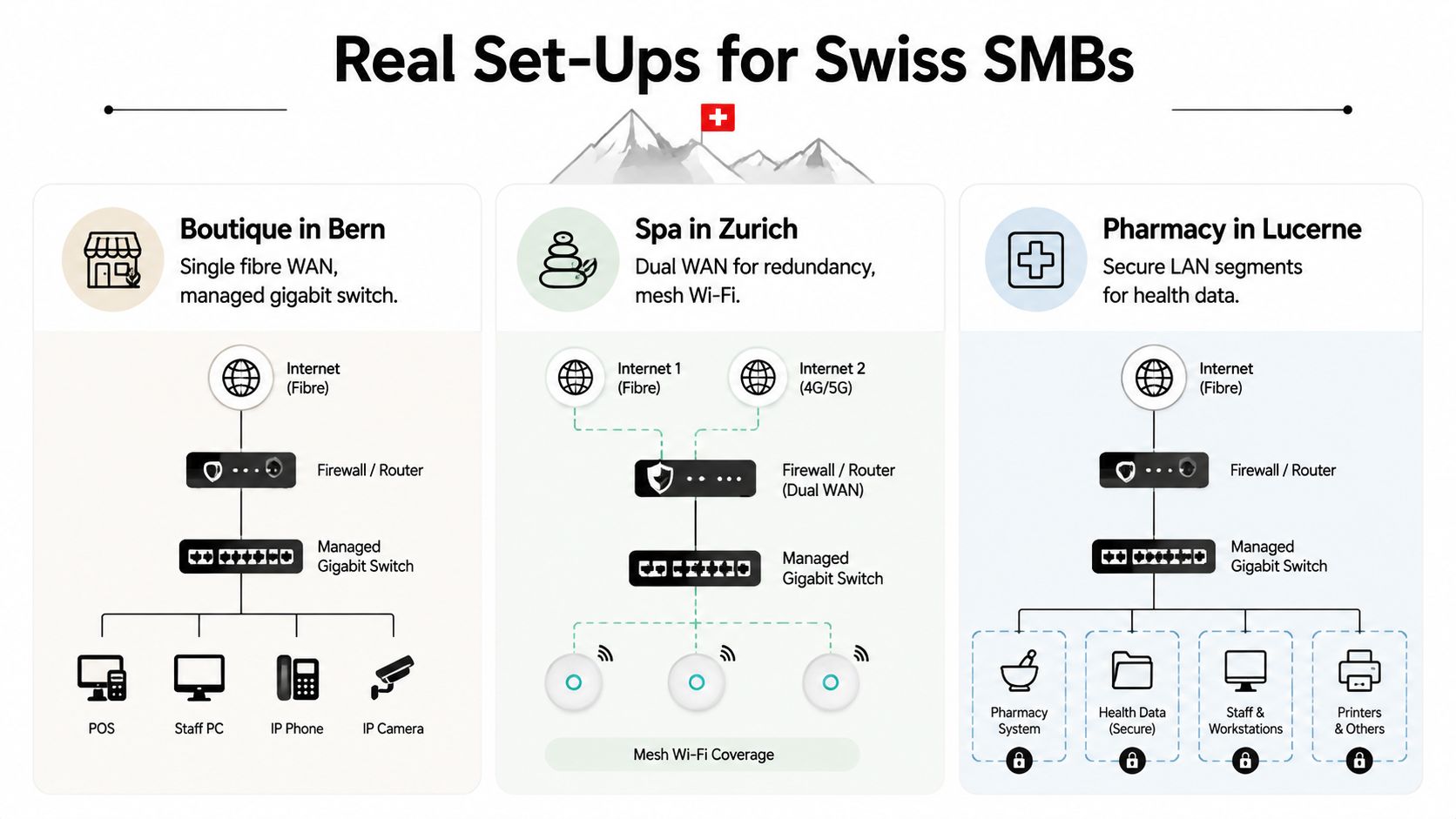
For a single-store retailer, I recommend one business-grade fibre WAN, a managed gigabit switch in a locked or controlled back-office position, and a compact firewall at the WAN edge. Run wired connections to the till, office workstation, printer, and any fixed back-office equipment. Use ceiling or high-wall access points for staff and guest Wi-Fi rather than placing the only access point behind stock or display units.
Create separate network segments for:
- Payment and POS: Keep payment devices away from guest traffic.
- Back office: Connect tablets, stock systems, printers, and staff computers.
- Guest Wi-Fi: Give customers internet access without exposing business devices.
- Building devices: Place cameras or other connected equipment in a restricted segment.
A small store doesn't need a complicated multi-site overlay. It does need a documented switch layout, sensible firewall rules, and a cable audit that identifies every live connection.
Day spa in Lausanne
A spa has a different physical problem. Treatment rooms may be separated by thick walls, wet areas, or shielding materials that weaken wireless coverage. Put access points where they serve the floor plan, not where the installer finds the nearest power socket. Wire reception and office computers whenever possible, then use Wi-Fi for mobile staff devices and suitable treatment-room equipment.
I favour a dual-WAN design for a spa that depends heavily on online bookings. Use fibre as the primary service and 5G as the failover path. The firewall should monitor both links, switch automatically when the primary fails, and log every transition so staff can explain a brief interruption.
Don't confuse mesh coverage with resilience. Multiple wireless access points improve the LAN. A second WAN improves the route beyond the building. They solve different problems.
Pharmacy in Basel
For a pharmacy, start with data boundaries. Use the fibre WAN for hosted systems and a separate mobile failover service. Keep the dispensing-room LAN isolated from customer Wi-Fi, then apply further segmentation between dispensing terminals, robotic picking equipment, and any loyalty or marketing application server.
Put the core switch and firewall where staff cannot casually unplug them, and label the cable runs at both ends. Keep fixed dispensing devices wired where the floor plan allows it. Wireless access should serve mobility, not replace structured cabling for equipment that processes critical transactions.
The architecture may look less glamorous than a high-speed Wi-Fi upgrade, but it gives the pharmacist something more valuable: a clear fault boundary. When a guest network misbehaves, it shouldn't interrupt dispensing. When the WAN fails, the failover path should already be configured and tested.
Resilience, Security, and Vendor Selection in Switzerland
Swiss businesses shouldn't treat connectivity as a simple speed purchase. Switzerland combines strong national broadband adoption with meaningful differences between cantons, providers, and physical routes. Cloud dependence makes those differences operational, while cyber obligations make poor preparation harder to defend.
The Federal Council made cyber-incident reporting mandatory for critical infrastructure operators from 1 April 2025, as noted in Internet Society's Switzerland report. The practical implication is clear: your network plan needs resilience, monitoring, documented responsibilities, and an incident process, not only a faster line.
Select the provider against your actual risk
Large Swiss ISPs such as Swisscom or Sunrise can suit a single location that values one support relationship. A managed service provider is often a better fit for hybrid cloud, multiple sites, segmentation, and proactive monitoring. Regional utilities can also be strong candidates where they combine fibre access with local support.
Ask every supplier to answer these questions in writing:
- Service geography: Where are the access network, support team, and relevant data-centre services located?
- Repair commitment: What response and on-site repair terms apply to your address?
- Regulated-sector experience: Can the provider demonstrate familiarity with pharmacy, healthcare, and sensitive-data requirements?
- Contract clarity: Are installation, support, equipment, and recurring charges clearly separated in CHF?
- Language coverage: Can staff obtain support in German, French, or Italian where required?
- Comparable references: Has the supplier supported retailers, pharmacies, spas, or clinics with similar operating needs?
Build failover into operations
A dual-WAN router is useful only when the business tests it. Schedule controlled failover tests, record which applications recover, and confirm whether payment, booking, voice, and dispensing workflows behave as expected. Keep backups in a Swiss cloud where that fits your compliance and recovery requirements, and maintain a written incident playbook with named contacts and escalation duties.
Security decision: Provider diversity matters only when the backup path is physically and operationally independent.
The Swisscom network-test coverage and WAN connectivity information reflects a market where mobility, long-distance reliability, fibre, and multi-provider control increasingly influence buying decisions. That's the right direction for Swiss SMBs. Resilience should be designed around the business process, not added after the first outage.
Choosing Your Ideal WAN vs LAN Mix and Next Steps
Don't choose a network by copying a larger company. Choose it by matching the WAN to your operating dependency and the LAN to the shape of your premises.
| Swiss SMB profile | WAN recommendation | LAN recommendation | Resilience layer |
|---|---|---|---|
| Single-shop retailer | Business fibre with a firewall-managed internet edge | Managed switch, wired POS, separated staff and guest networks | Mobile failover if payment or cloud POS cannot tolerate an outage |
| Multi-site spa chain | Managed hybrid WAN with central policy and provider monitoring | Standardised wired back office, coordinated access points, segmented treatment and guest access | Dual-WAN at priority sites, tested centrally |
| Independent Apotheke | Fibre with an encrypted, monitored provider edge | Wired dispensing equipment, isolated health-data segment, separate guest access | Independent 4G or 5G failover, documented incident response |
My recommendation by business type
A Geneva boutique doesn't need SD-WAN just because the term appears in a supplier brochure. It needs a stable fibre service, a properly segmented LAN, and a mobile backup if its payment and cloud systems depend on continuous access.
A multi-site spa chain does need central control. Standardise the local LAN build, monitor each WAN, and choose a managed approach that can prioritise booking, voice, and business applications across sites. For a useful overview of managed SD-WAN concepts, review this Premier Broadband managed network tag, then ask the supplier to explain precisely what it will manage for your premises.
An independent Apotheke should spend first on segmentation and failover, not decorative Wi-Fi upgrades. Keep dispensing equipment wired, isolate customer access, and make sure staff know what happens when the primary circuit fails.
Your next 30 days
Days 1 to 7: Request address-specific fibre quotations from Swisscom, Sunrise, and Init7 where available. Confirm whether your building has FTTP, FTTB, cable, or another access type, and ask for upload, repair, and service-boundary details.
Days 8 to 14: Order a 4G or 5G failover SIM from a suitable provider such as Salt or Swisscom, subject to address coverage and business requirements. Have your IT partner audit every cable, switch port, access point, firewall rule, and network segment.
Days 15 to 21: Test local and external application performance separately. Record latency, jitter, and packet loss during normal operating periods, then document which services must remain available during an outage.
Days 22 to 30: Run your first cyber-incident reporting dry-run. Name the internal decision-maker, the technical contact, the provider escalation route, and the person responsible for preserving records and communicating with the relevant authority.
This week, ask your IT partner to prove whether your current problem is LAN, WAN, or both, and don't sign a new contract until the answer is written down.
beautysecrets.agency can help Swiss pharmacies, retailers, spas, and wellness partners build dependable digital operations around carefully selected natural and premium product ranges. Visit beautysecrets.agency to discuss a trade partnership that supports your customers and your day-to-day business needs.